Now Reading: How I Automated Customer Support Intent Routing with AI Chatbots
-
01
How I Automated Customer Support Intent Routing with AI Chatbots

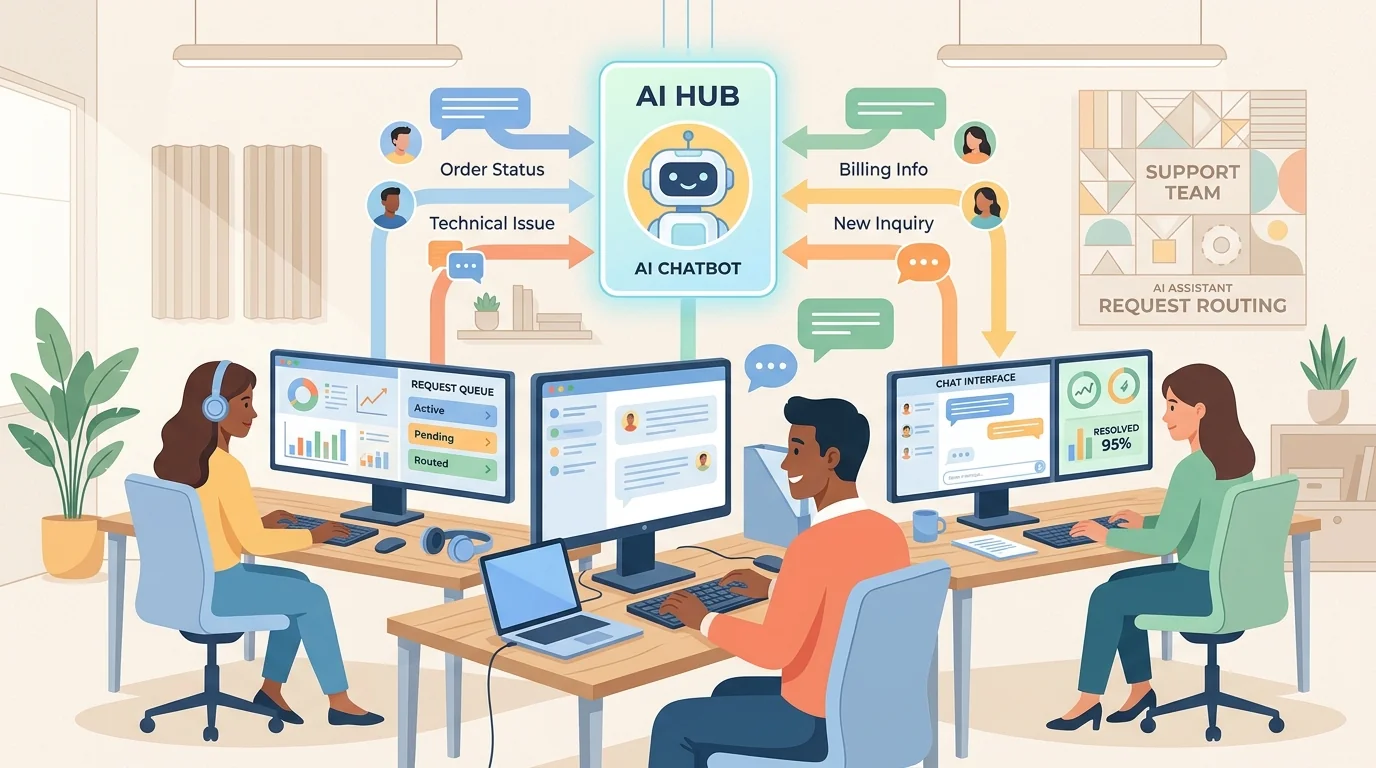
If you have ever spent a Monday morning wading through hundreds of mixed support tickets, you know the dread. Billing questions sitting next to urgent server outages, password resets buried under angry refund requests. For months, our support team played air traffic controller by hand, reading every incoming email just to decide who should handle it. That broke down fast as we grew. Setting up ai chatbot customer support intent routing changed the game for us, and I want to share the practical setup that made it work without annoying our customers.
Key Takeaways
Quick summary of how to build an effective AI intent routing pipeline:
- Intent routing uses natural language processing to categorize messages by user goal rather than simple keyword matches.
- High-confidence routine queries (like invoice lookups or password resets) can be resolved instantly by the bot without human intervention.
- Sensitive intents such as billing disputes or account cancellations should trigger immediate escalation to specialist staff.
- Tracking sentiment alongside intent prevents angry customers from getting stuck in repetitive bot conversation loops.
- You can connect this system smoothly with your broader workflows on Xan Digital to keep support aligned with growth.
Why Traditional Rule-Based Routing Fails
Most basic helpdesk setups rely on keyword matching or rigid menu trees. You know the ones: “Press 1 for Sales, Press 2 for Support.” Customers hate them because real human language is messy and unpredictable. Someone writing “My card was charged twice for the renewal” might trigger both billing rules and renewal rules, ending up in the wrong queue entirely.
When an incoming ticket hits the wrong department, it sits idle until an agent notices, reassigns it, and pushes it back into another queue. Each handoff adds hours to first-response time. In our early tests, misrouted tickets took almost three times longer to resolve than tickets routed correctly on the first attempt.
Modern natural language classifiers look at semantic context instead of isolated words. When a customer writes “I need to change where my invoice goes,” the model understands this is an account management intent, not an active dispute, and points the user to the self-serve billing portal instantly.
The Core Building Blocks of Intent Classification
Before writing a single prompt or webhook, you need a clear taxonomy of what your customers actually ask. Throwing raw messages at an LLM without predefined categories leads to chaotic tagging and inconsistent queues.
1. Mapping Your Intent Hierarchy
I started by pulling six months of past ticket history and grouping them into four primary buckets: Informational, Transactional, Technical, and Sensitive. Each top-level bucket contains specific sub-intents that correspond to an action or a dedicated team:
- Informational: Feature availability, pricing questions, business hours, documentation lookups.
- Transactional: Update credit card, download invoice, upgrade subscription, request refund.
- Technical: Bug reports, API errors, integration downtime, credential resets.
- Sensitive: Data deletion requests (GDPR), chargeback warnings, executive escalations.
Notice that sensitive inquiries are given their own priority branch. If a customer expresses urgent frustration or mentions legal terms, you never want a chatbot offering canned suggestions. Immediate human handoff is non-negotiable here.
2. Setting Up the Confidence Threshold Score
Every classification model returns a confidence score alongside its predicted category. A rookie mistake is treating any prediction as absolute truth. I set a strict confidence bar: anything above 85% confidence gets routed automatically, while anything below gets flagged for a quick human glance.
If a customer says something ambiguous like “It stopped working,” the confidence score drops because the bot cannot distinguish between a software bug and a forgotten login. Instead of guessing, the bot asks a single clarifying question: “Are you unable to sign in, or is an existing feature throwing an error?” That single prompt refines the intent cleanly.
Step-by-Step Architecture for Real-Time Routing
Building this pipeline does not require an enterprise engineering budget. We connected our web chat widget and email intake directly to an intent engine using serverless webhooks. Here is the exact flow we deployed.
Inbound Ingestion and Pre-Processing
When a message arrives, the system strips email signatures, past reply chains, and boilerplate confidentiality notices. Feeding clean user text into the classifier saves tokens and dramatically improves classification precision.
Next, we check user metadata. Is this customer on our premium tier? Is their account overdue? Knowing who is asking is just as important as knowing what they are asking. A critical server bug from a enterprise customer requires a faster escalation path than a general inquiry from a free trial user.
Intent Classification and Sentiment Scoring
The cleaned text passes through our lightweight classifier. The model outputs structured JSON with three data points: primary intent, secondary intent, and sentiment polarity (positive, neutral, or negative). Here is an example of what that payload looks like behind the scenes:
If sentiment is strongly negative, the system bypasses standard automated deflectors. If a customer is furious about a billing surprise, forcing them to interact with a bot will only escalate their anger. Route them straight to a sympathetic human specialist.
Action Dispatch and Resolution Paths
Once classified, the ticket takes one of three paths:
- Instant Self-Service: If intent is “download invoice” and the user is logged in, the bot pulls the secure invoice link via API and provides it right in the chat. Time to resolution: 4 seconds.
- Smart Deflection: If intent is a how-to question, the bot retrieves verified snippets from your documentation. To see how to prepare clean data for this, check our guide on training an AI support chatbot on your internal knowledge base.
- Direct Escalation: Technical bugs and sensitive issues are injected directly into the Tier 2 support queue with the intent tags and summary already attached, saving the agent several minutes of triage time.
This automated triage ties directly into methods to reduce support tickets with AI chatbots while improving overall satisfaction ratings.
Handling Edge Cases and Avoiding the Dreaded Bot Loop
We have all suffered through terrible customer service bots that repeatedly say “I didn’t quite catch that. Could you rephrase?” like a broken record. To prevent our users from throwing their keyboards across the room, I implemented two golden circuit breakers.
The first rule is the Two-Strike Limit. If the chatbot fails to identify intent with sufficient confidence twice in a row, it stops asking questions immediately. It responds: “I want to make sure you get the right help, so I am handing this conversation directly to my team.” It gathers the conversation transcript, tags the ticket as unclassified, and assigns an agent.
The second rule is Explicit Escape Hatching. At any point during a chat conversation, if the customer types “agent,” “human,” or “talk to a person,” the intent engine instantly overrides all logic and transfers the conversation. Giving customers autonomy builds trust rather than resentment.
To keep email deliverability high when sending automated notification summaries and updates, make sure your sending infrastructure is rock solid. You can review our advice on best email marketing tools for high deliverability to ensure operational messages reach user inboxes without landing in spam.
Measuring Performance and Refining Your Intents
You cannot set up intent routing once and forget about it. Customer language changes with every product release or website redesign. I spend thirty minutes every Friday reviewing misrouted tickets to spot emerging patterns.
Here are the key metrics I monitor weekly:
- First-Contact Resolution (FCR): The percentage of tickets solved without secondary agent reassignment.
- Routing Accuracy Rate: How often the initial intent tag matched the final resolution category. Aim for above 90%.
- Deflection Rate without Reopen: Tickets resolved by the automated response where the customer did not reopen the thread within 72 hours.
- Customer Effort Score (CES): Quick post-chat surveys asking “How easy was it to get your issue resolved today?”
Authoritative industry benchmarks from organizations like W3C Web Accessibility Guidelines and customer experience studies compiled by Zendesk Benchmark Reports consistently show that speed combined with seamless human escalation produces the highest customer retention rates.
Frequently Asked Questions
What is the difference between intent routing and keyword routing?
Keyword routing searches for specific words (like “billing” or “login”) and often fails when words have multiple meanings or typos. Intent routing uses natural language processing to understand the customer’s underlying goal, analyzing full sentence meaning and context regardless of the exact phrasing.
How many intents should I start with when setting up a support bot?
Start small with 8 to 12 high-frequency intents that represent the majority of your ticket volume. Creating hundreds of hyper-specific intents early on confuses the classification model and makes maintenance overwhelming. Expand your taxonomy only after achieving stable accuracy.
What should happen if the AI is unsure about a customer intent?
When the model’s confidence score falls below your predetermined threshold (such as 80% or 85%), the bot should either ask one clarifying question with multiple-choice buttons or gracefully transfer the conversation to a human agent without guessing.
Can intent routing help prevent customer churn?
Yes. By pairing intent routing with sentiment analysis, the system detects cancellation signals and frustrated language instantly. These high-risk tickets can be routed directly to senior customer success specialists within seconds, allowing you to intervene before the customer cancels.
Automating your support routing is not about replacing human empathy with cold algorithms. It is about clearing out the busywork so your team has the time and energy to solve complex customer problems when it matters most.